
Walrus delivers exceptional write throughput and competitive latency characteristics. This page presents comprehensive benchmark results comparing Walrus against industry-standard systems.Documentation Index
Fetch the complete documentation index at: https://mintlify.com/nubskr/walrus/llms.txt
Use this file to discover all available pages before exploring further.
Storage Engine Performance
The underlying Walrus storage engine has been benchmarked against Apache Kafka (single broker) and RocksDB’s Write-Ahead Log to measure raw write performance under various durability configurations.Benchmark Configuration
All benchmarks compare:- Walrus: Legacy
append_for_topic()endpoint usingpwrite()syscalls (without io_uring batching) - Kafka: Single broker with no replication and no networking overhead
- RocksDB: Write-Ahead Log implementation
These benchmarks measure single-node storage performance. The distributed Walrus system adds additional latency for consensus operations on metadata changes only (not on the data path).
Results Without Fsync
When fsync is disabled (writes acknowledged before guaranteed disk persistence), Walrus demonstrates superior throughput: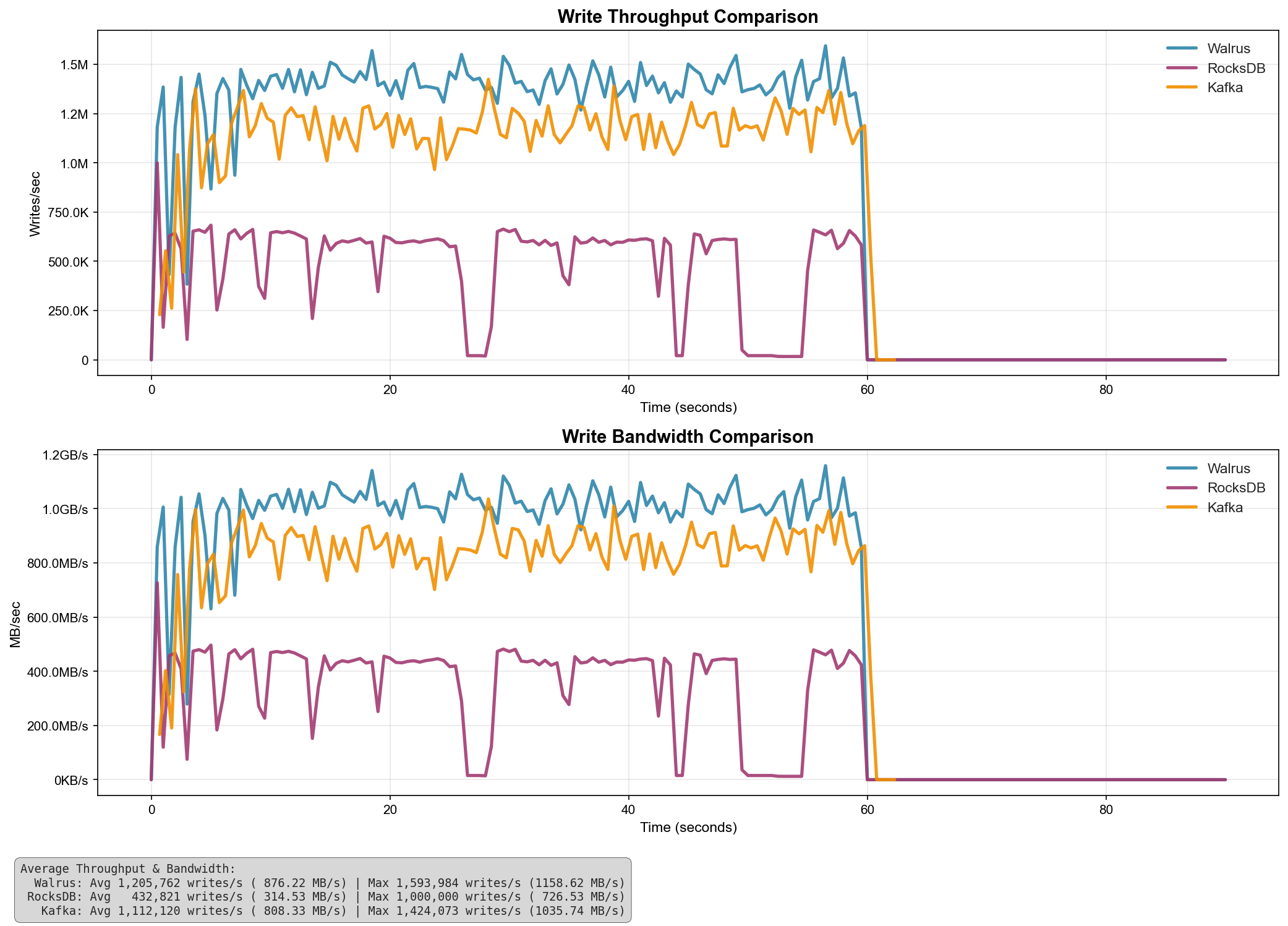
| System | Avg Throughput (writes/s) | Avg Bandwidth (MB/s) | Max Throughput (writes/s) | Max Bandwidth (MB/s) |
|---|---|---|---|---|
| Walrus | 1,205,762 | 876.22 | 1,593,984 | 1,158.62 |
| Kafka | 1,112,120 | 808.33 | 1,424,073 | 1,035.74 |
| RocksDB | 432,821 | 314.53 | 1,000,000 | 726.53 |
Key Findings
Key Findings
- Walrus outperforms Kafka by 8.4% on average throughput
- Walrus outperforms RocksDB by 178% on average throughput
- Peak bandwidth reaches 1,158.62 MB/s with Walrus
- Walrus maintains consistent high throughput under sustained load
Results With Fsync
When fsync is enabled on each write (ensuring data is flushed to disk before acknowledging), all systems show similar performance characteristics due to disk I/O becoming the bottleneck: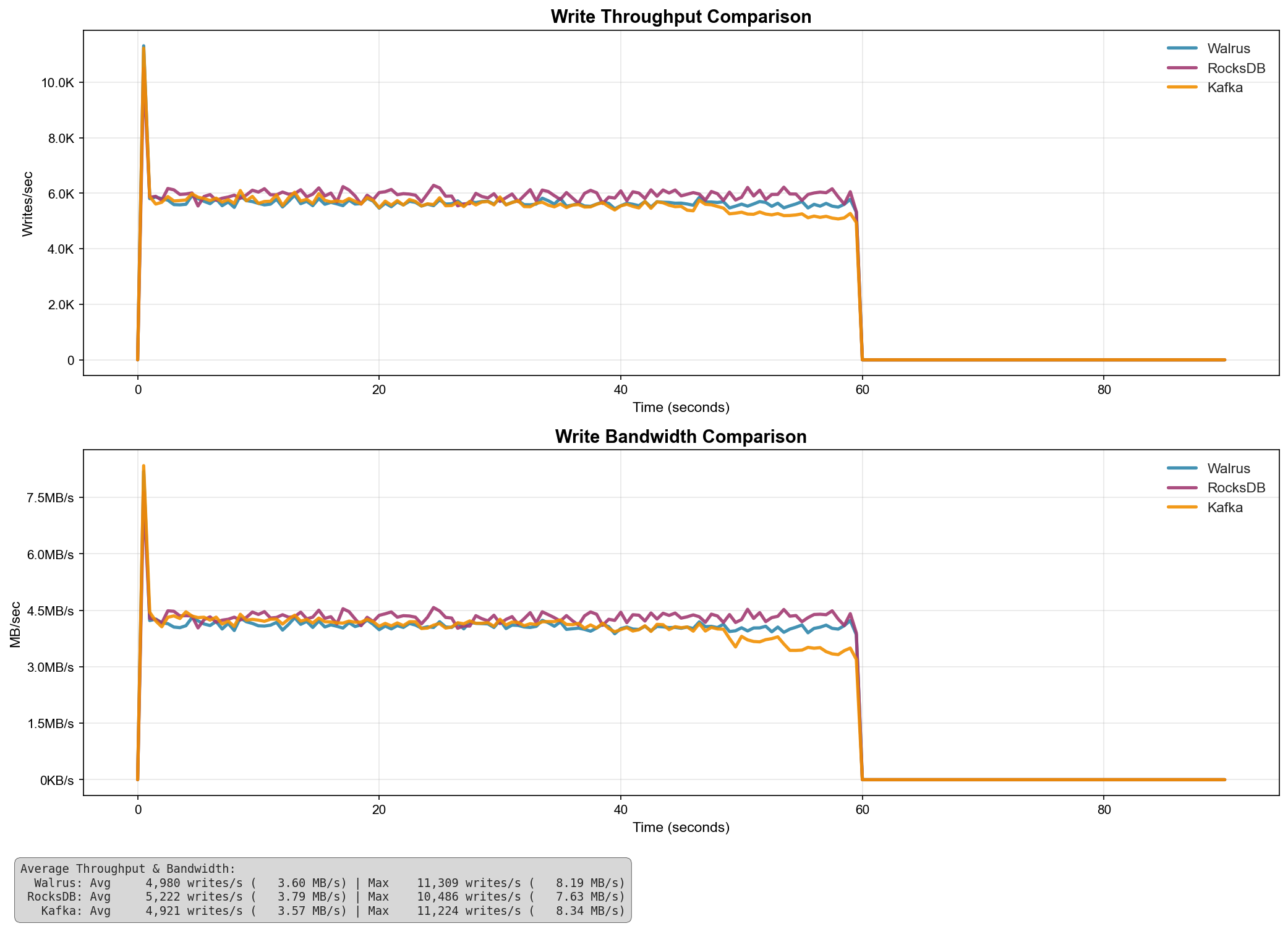
| System | Avg Throughput (writes/s) | Avg Bandwidth (MB/s) | Max Throughput (writes/s) | Max Bandwidth (MB/s) |
|---|---|---|---|---|
| RocksDB | 5,222 | 3.79 | 10,486 | 7.63 |
| Walrus | 4,980 | 3.60 | 11,389 | 8.19 |
| Kafka | 4,921 | 3.57 | 11,224 | 8.34 |
Key Findings
Key Findings
- With fsync enabled, disk I/O becomes the primary bottleneck
- All systems show comparable average throughput (within 6% of each other)
- Walrus achieves the highest peak throughput at 11,389 writes/s
- Performance is heavily dependent on underlying storage hardware
Distributed System Performance
The distributed Walrus platform adds the following characteristics:Write Throughput
Single writer per segment due to lease-based write fencing. Scales horizontally across segments.
Read Throughput
Scales with replicas for sealed segments. Multiple readers can access historical data simultaneously.
Latency
Approximately 1-2 RTT for forwarded operations plus underlying storage latency.
Consensus Overhead
Metadata operations only. Data writes do not require consensus, reducing latency.
Segment Rollover Performance
- Default threshold: 1,000,000 entries per segment
- Typical segment size: ~100MB (varies with payload size)
- Rollover latency: Metadata-only operation via Raft consensus
- Data movement: None required (sealed segments remain on original leader)
Future Optimizations
The following optimizations are planned for future releases:- io_uring batching: Current benchmarks use legacy
pwrite(). Enabling io_uring batch operations will significantly improve throughput. - Multi-segment writes: Allow concurrent writes to multiple segments within a topic.
- Compression: Optional compression for sealed segments to reduce storage overhead.
- Read-ahead caching: Predictive caching for sequential read workloads.